
Fire detection · Waste and recycling
Detect fire risks earlier with AI-powered CCTV.
VisionCTRL watches the cameras you already have for smoke and early signs of fire, then alerts the right person with the clip. It works alongside your certified fire systems, not instead of them.
- Uses your existing CCTV
- Works with thermal cameras where you have them
- Alerts go to people you choose
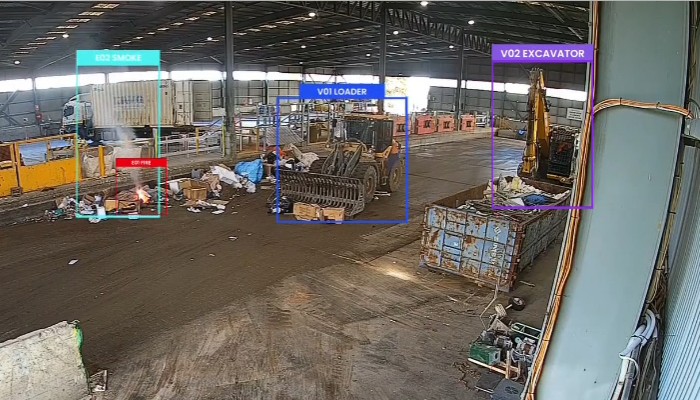 Platform view · demo mode
Why it matters
Fires don’t wait for staffed hours.
Waste sites carry a mix of risks: lithium-ion batteries hidden in mixed loads, heat in stockpiles and large areas that few people can watch at once. Cameras often record the first sign. The problem is that no one is looking.
Lithium-ion batteries
Batteries arrive in mixed loads and can ignite when crushed or compacted. Smoke is often the first sign anyone can see.
Out of hours
Nights and weekends rely on people who cannot watch every camera at once.
Slow escalation
Between the first sign and the right person knowing, time goes on checking footage and making calls.
Manual monitoring
Nobody can watch dozens of camera views all day, so moments are often found after the event.
How it works
From camera view to the right person, in four steps.
- 01
Connect
VisionCTRL connects to compatible existing cameras, including thermal cameras where you have them. We check compatibility with you first.
- 02
Watch
The AI watches the areas you choose, such as tipping floors, stockpiles and sorting lines, for smoke and signs of fire.
- 03
Alert
When something looks wrong, the people you nominate get an alert with the clip and a short summary.
- 04
Review
They check the footage and decide what to do under your own procedures. The evidence is kept for later review.
Where it watches
Point it at the places that worry you most.
Tipping floors and push walls
Where mixed loads land and heat or smoke can build.
Stockpiles and bays
Stored material that can smoulder before anyone sees it.
Sorting lines, conveyors and balers
Machinery areas where friction and sparks are a risk.
E-waste and battery areas
Storage and handling areas for higher-risk items.
Yards and out-of-hours views
Camera views that matter when the site is quiet.
Camera views and alert settings are agreed with you in the walkthrough.
Alert and escalation
What an alert looks like.
An illustrative workflow. Who is alerted, and what happens next, follows your own procedures.
- Smoke appears on a tipping floor cameraThe AI flags it in the camera view you set up.
- An alert goes to the nominated personIt includes a link to the clip and a short summary.
- They check the footageA person confirms whether it needs action.
- Your site response startsYour procedures decide who is called and what happens next.
- The incident is savedClip, time and camera are kept so the event can be reviewed.
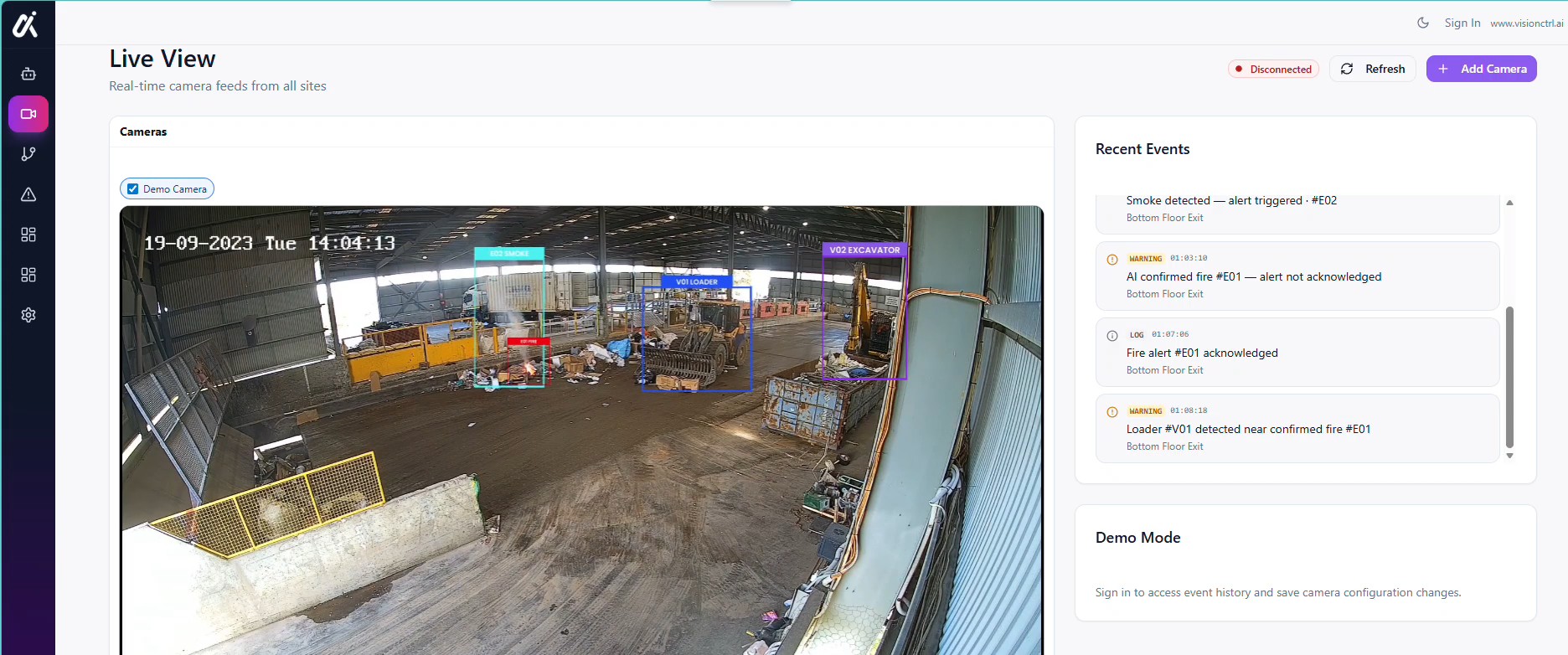 Platform view · demo mode
Your cameras
Built around the camera network you already have.
Most sites already have cameras on the areas that matter. VisionCTRL starts there.
- Existing CCTV and IP cameras
- Thermal cameras where you already have them
- Compatibility checked with you before anything is installed
We don’t list supported makes or models on this page. We confirm what your cameras can support in the walkthrough.
A second pair of eyes, not a replacement.
VisionCTRL is not a certified fire detection, alarm or suppression system, and it does not replace one. It adds camera-based awareness on top of the systems you already rely on, so something that needs checking can reach a person’s attention.
Common concerns
Questions we expect before you book.
Straight answers on what we can and cannot say here, and what we will cover in the walkthrough.
Will it work with our cameras?
We start from the cameras you already have. Send us the make, model and a sample view and we will tell you honestly whether it is suitable, before you commit to anything.
What about false alarms?
No detection system is perfect, and we do not quote accuracy figures here because they depend on your site and scenario. Each alert comes with its clip so a person can check it quickly, and alert settings are reviewed with you for each camera view.
How much work is it for us?
It is scoped with you for each site. We do not quote a standard timeframe or price on this page. In the walkthrough we cover what we would need from your team, including IT involvement, and what a first phase could look like.
What about privacy and our data?
How people appear in footage, who can view it, where it is processed and how long it is kept are agreed with you and covered before you decide. Our privacy policy explains how we handle website enquiries.
Does it connect to our existing systems?
Alerts go to the people you choose, for example in Teams or by SMS. Whether VisionCTRL connects to your VMS, alarm or other systems depends on the system, and we confirm it in the walkthrough. It does not replace your certified fire or alarm systems.
One camera network
The same cameras can do more.
FAQs
Common questions.
Does VisionCTRL replace our fire alarm or suppression system?
No. It is not a certified fire safety system and should not be treated as one. It adds camera-based awareness alongside your existing systems and procedures.
Do we need thermal cameras?
No. VisionCTRL works with compatible existing cameras. Where you already have thermal cameras, they can be included. We confirm what your cameras can support in the walkthrough.
Can it detect lithium-ion battery fires?
It looks for visual signs of smoke and fire in the areas you choose. Battery fires can start inside a pile, where a camera cannot see, so we do not promise to detect every event.
Who gets alerted, and what happens next?
The people you nominate are alerted with the clip. Your team decides the response under your own procedures. Alert channels and any integrations are covered in the walkthrough.
What about false alerts?
Any detection system can raise alerts that turn out to be nothing. Each alert comes with its clip so a person can check it quickly, and we discuss alert settings for your camera views in the walkthrough.
Does it work out of hours?
It watches the camera views you set up whenever they are streaming, including nights and weekends. Who receives the alert out of hours is agreed with you.
How long does set-up take?
It depends on your cameras, network and sites. We do not quote a standard timeframe here. We scope it with you in the walkthrough.
What happens to our footage and data?
Data handling depends on how VisionCTRL is set up for your site. We cover where processing happens and how long data is kept in the walkthrough. Our privacy policy explains how we handle website enquiries.