
Near-miss detection · Workplace safety
Spot the near misses your cameras already capture.
VisionCTRL looks for the risk scenarios you set up, such as people entering vehicle zones, and surfaces the clip so your team can review and act.
- Uses your existing CCTV
- You choose the scenarios and zones
- Every alert comes with its clip
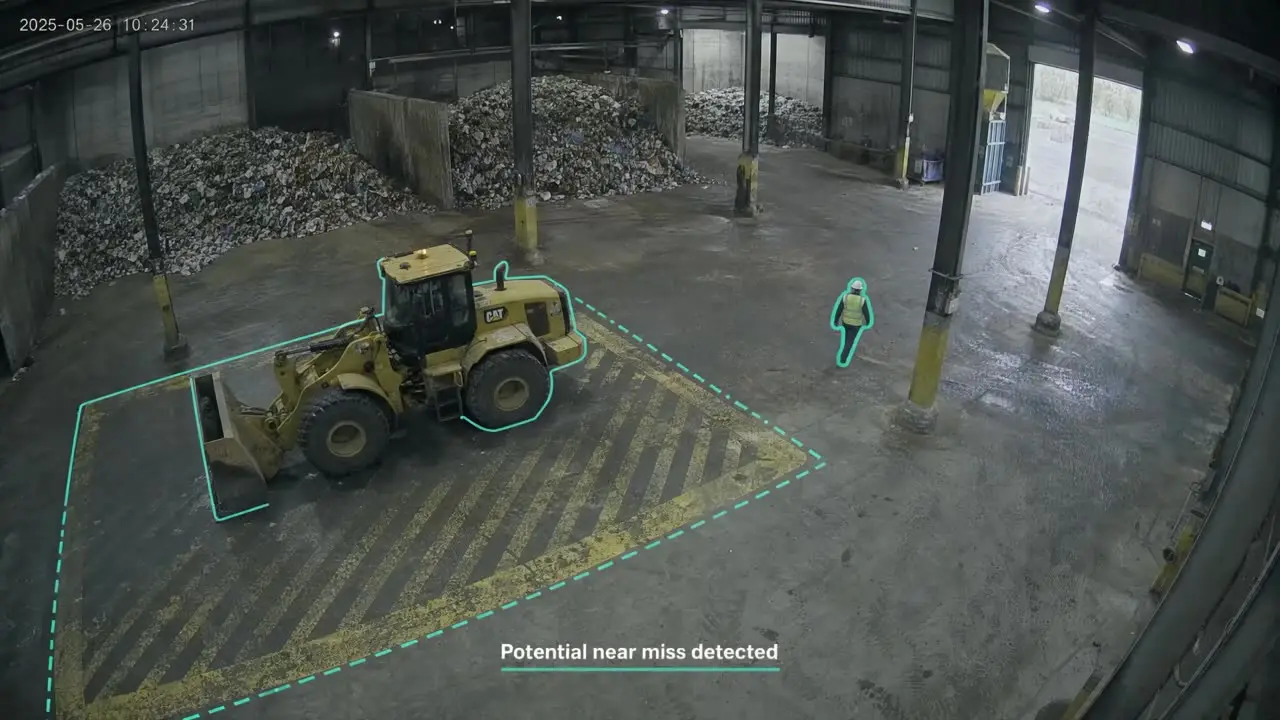 Real VisionCTRL output
The risk
Near misses are easy to miss and easy to forget.
A reversing truck, a pedestrian in the wrong place, a forklift turning too fast. Cameras often capture these moments, but spotting them and writing them up depends on someone noticing. These are the moments teams worry about. Which ones VisionCTRL can flag on your site depends on your camera views.
Reversing vehicles near pedestrians
People close to a vehicle that is backing up, often in a busy yard or tipping area.
People in vehicle operating zones
Someone steps into an area where loaders or trucks are working.
Forklift and pedestrian interactions
Shared aisles and crossings where paths meet.
Repeated unsafe activity
The same shortcut, the same spot, week after week.
Slow manual investigations
Finding the right footage takes time when you start with a search.
Little view of recurring risks
One-off reports make it hard to see where the pattern is.
How it works
From camera view to reviewed event.
- 01
Configure
You and we choose the camera views, zones and scenarios that matter on your site.
- 02
Detect
The AI watches for those scenarios and flags potential near misses.
- 03
Surface
The clip and a short summary are put in front of the right person.
- 04
Review
Your team confirms what happened, records it and decides the follow-up.
Evidence
From clip to evidence.
Each flagged event keeps its clip, time and camera, so an investigation starts with the footage instead of a search through hours of recordings.
- The clip is saved with the event
- A short AI summary describes what was seen
- Events can be reviewed, acknowledged and followed up
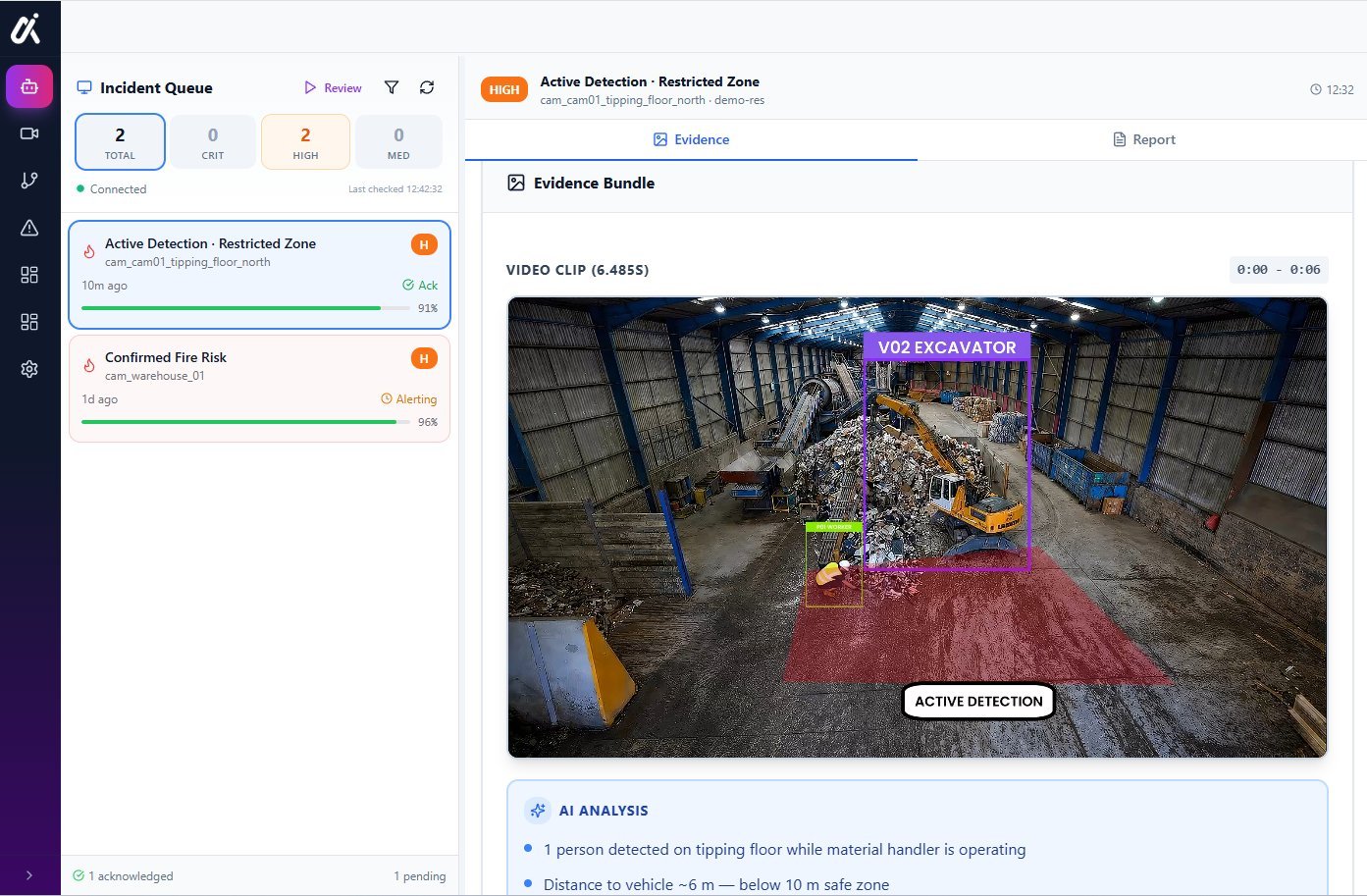 Platform view
Patterns
See the pattern, not just the event.
Because every event is saved with its clip and time, your team can look back for places and times where the same risks keep recurring.
Alerts
Tell the right people, the right way.
Choose who is told about each scenario and how, for example a supervisor in Teams or by SMS. Alert settings are agreed with you for each camera view.
What this does, and what it doesn’t.
VisionCTRL identifies potential near misses in the scenarios you set up. It does not promise to detect every near miss, and it does not replace your people’s judgement. Your team reviews each event and decides what happens next.
Common concerns
Questions we expect before you book.
Straight answers on what we can and cannot say here, and what we will cover in the walkthrough.
Will it work with our cameras?
We start from the cameras you already have. Send us the make, model and a sample view and we will tell you honestly whether it is suitable, before you commit to anything.
What about false alarms?
No detection system is perfect, and we do not quote accuracy figures here because they depend on your site and scenario. Each alert comes with its clip so a person can check it quickly, and alert settings are reviewed with you for each camera view.
How much work is it for us?
It is scoped with you for each site. We do not quote a standard timeframe or price on this page. In the walkthrough we cover what we would need from your team, including IT involvement, and what a first phase could look like.
What about privacy and our data?
How people appear in footage, who can view it, where it is processed and how long it is kept are agreed with you and covered before you decide. Our privacy policy explains how we handle website enquiries.
Does it connect to our existing systems?
Alerts go to the people you choose, for example in Teams or by SMS. Whether VisionCTRL connects to your VMS or other safety systems depends on the system, and we confirm it in the walkthrough.
One camera network
The same cameras can do more.
FAQs
Common questions.
How is this different from near-miss reporting software?
Reporting software relies on a person noticing an event and filling in a report. VisionCTRL starts from the camera: it flags potential events from footage and attaches the clip, so a report can start with evidence. The two can complement each other.
Which scenarios can it look for?
Common ones include people near moving vehicles, people entering vehicle zones and forklift and pedestrian interactions. What is possible depends on your camera views, and we confirm it in the walkthrough.
Will it catch every near miss?
No. It identifies potential near misses in the scenarios you set up. Camera position, lighting and the scenario all matter, and your team reviews each flagged event.
Can it help with forklift and pedestrian safety?
Yes. Forklift and pedestrian interactions are one of the scenarios it can look for, where the camera view allows.
Do we need new cameras?
Not as a starting assumption. VisionCTRL works with compatible existing cameras. We check your camera views in the walkthrough.
Who sees the alerts?
The people you choose, for example a supervisor or safety lead, through channels set up with you such as Teams or SMS.
How do you handle privacy?
How people appear in footage, who can view it and how long it is kept are covered in the walkthrough. For how we handle website enquiries, see our privacy policy.