
AI CCTV analytics · Operational intelligence
Your CCTV can do more than record.
VisionCTRL adds AI to the cameras you already have, so they can flag safety risks, show where operations are slowing down and keep the evidence.
- Uses your existing cameras
- Safety and operations from one network
- Alerts to the right people
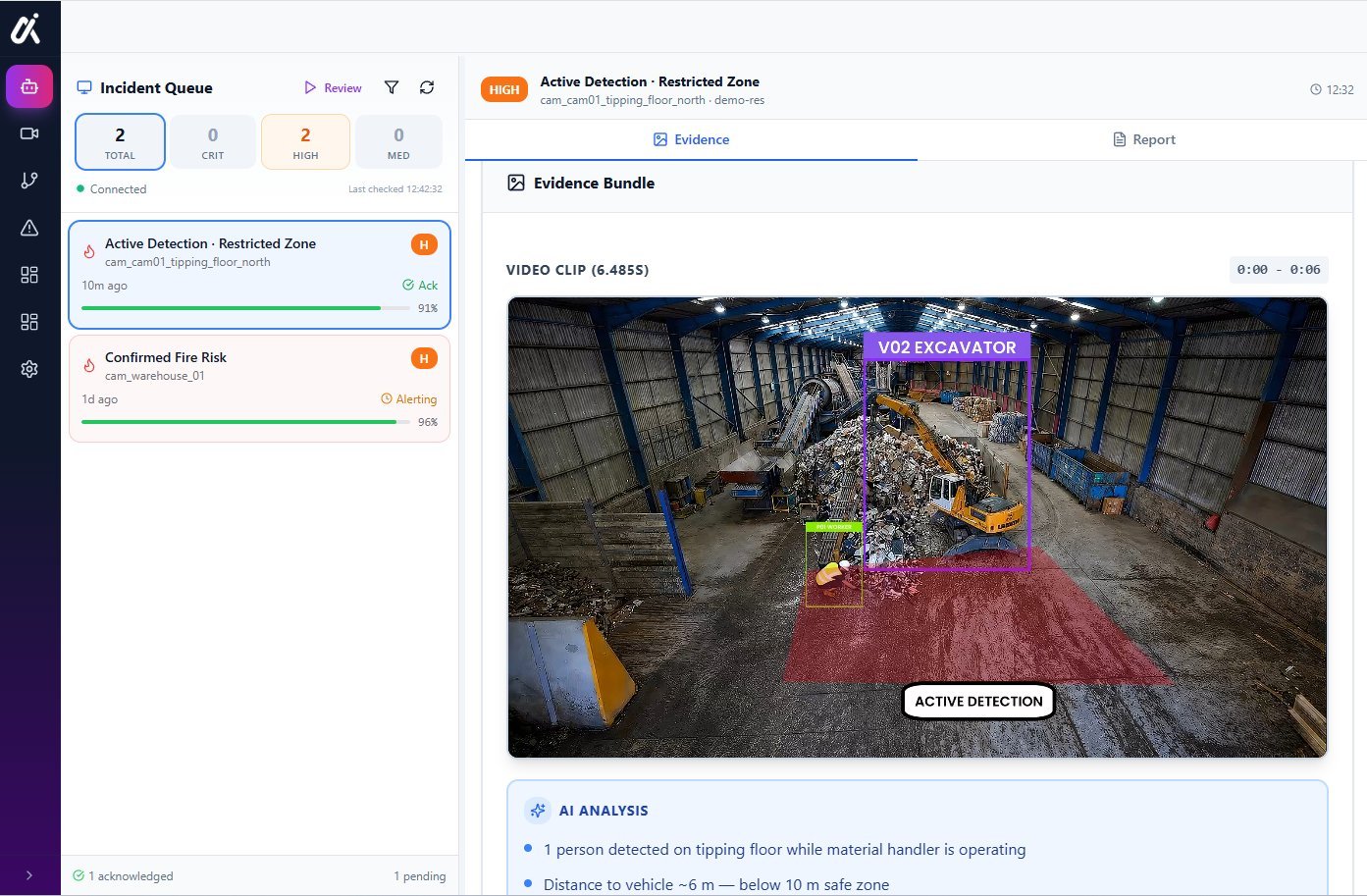 Platform view
The difference
Recording, rules, or understanding.
Not all CCTV analytics are the same. Here is how the three approaches differ.
Conventional CCTV
Records what happens. Someone has to be watching live, or search the footage afterwards.
Rule-based video analytics
Adds fixed rules, such as motion in an area or a line being crossed. Useful for simple triggers, but it reacts to the rule and not the situation, so it can alert on harmless activity.
VisionCTRL
Uses AI to recognise people, vehicles and conditions such as smoke, applies the rules and zones you set for your site, and keeps the clip and a summary as evidence.
These are not opposites. VisionCTRL still uses your site’s rules and zones. The difference is what the system can recognise.
What it can do
One camera network. Many jobs.
Safety risk detection
Flag people close to moving vehicles and other risks you configure.
Learn more →Fire and smoke
Spot smoke and fire risks at waste and recycling sites.
Learn more →Congestion and queues
Spot where vehicles and machines are waiting.
Vehicle dwell times
See how long vehicles stay at each bay or area.
Exclusion zones
Know when people or vehicles enter areas they shouldn’t.
Incident evidence
Every event saved with its clip and a summary.
Operational reporting
Daily reporting for operations and safety teams.
Alerts to the right person
Sent to the people you choose, for example in Teams or by SMS.
How it works
Detect. Understand. Act. Prove.
- 01
Detect
Finds people, vehicles and conditions in your camera views.
- 02
Understand
Puts it in context: where it is, when it happened and what is nearby.
- 03
Act
Alerts the right person, with the clip, so they can respond.
- 04
Prove
Keeps the evidence and summary for review and follow-up.
Your cameras
Start with what is already on site.
Most sites already have the cameras. VisionCTRL adds the intelligence on top.
- Existing CCTV and IP cameras
- Thermal cameras where you have them
- We check each camera view with you before rollout
Read why existing infrastructure is the practical starting point in our white paper. Existing cameras: the future of industrial safety →
Who it’s for
Built for operations, safety and IT.
Operations and site leaders
One view of safety and flow across your sites, with evidence behind every event.
Safety and WHS managers
Faster access to the footage behind an incident, and a clearer view of repeat risks.
IT and security teams
Questions on deployment, data location, retention and security are answered in the walkthrough.
Common concerns
Questions we expect before you book.
Straight answers on what we can and cannot say here, and what we will cover in the walkthrough.
Will it work with our cameras?
We start from the cameras you already have. Send us the make, model and a sample view and we will tell you honestly whether it is suitable, before you commit to anything.
What about false alarms?
No detection system is perfect, and we do not quote accuracy figures here because they depend on your site and scenario. Each alert comes with its clip so a person can check it quickly, and alert settings are reviewed with you for each camera view.
How much work is it for us?
It is scoped with you for each site. We do not quote a standard timeframe or price on this page. In the walkthrough we cover what we would need from your team, including IT involvement, and what a first phase could look like.
What about privacy and our data?
How people appear in footage, who can view it, where it is processed and how long it is kept are agreed with you and covered before you decide. Our privacy policy explains how we handle website enquiries.
Does it connect to our existing systems?
Alerts go to the people you choose, for example in Teams or by SMS. Whether VisionCTRL connects to your VMS or other systems depends on the system, and we confirm it in the walkthrough.
FAQs
Common questions.
What is AI CCTV analytics?
It is software that watches camera footage and recognises what is in view, such as people, vehicles and conditions like smoke, so it can alert someone and keep the evidence. VisionCTRL does this on your existing cameras.
How is it different from the analytics built into my cameras or VMS?
Built-in analytics usually apply fixed rules such as motion or line crossing. VisionCTRL uses AI to recognise what is in view and keeps evidence for review. We look at your current setup in the walkthrough and don’t assume either is better for you.
Do I need new cameras?
Not as a starting assumption. VisionCTRL works with compatible existing cameras, including thermal cameras where you have them. We check your camera views with you.
Which sites is it for?
Waste and recycling facilities first. It is designed for other industrial sites too, such as manufacturing, logistics and utilities.
Is it only for safety?
No. The same camera network can support safety, such as near misses and fire risk, and operations, such as congestion and vehicle dwell times.
How do alerts work?
You choose who is alerted for each scenario and how, for example in Teams or by SMS. Each alert comes with the clip.
What do I get from a walkthrough?
We review a relevant camera view or scenario with you, discuss the risks or inefficiencies you want to find, explore how it could work with your cameras and agree practical next steps.
What about data and security?
Where processing happens, how long data is kept and how access is controlled depend on how VisionCTRL is set up for you. We cover these in the walkthrough. Our privacy policy explains how we handle website enquiries.